Adding a frame in Photoshop Elements is simple using one
of the available templates from the graphics tab. Sometimes users wish to add a
key light or a fine outline to an image or to surround a shape. This can be
done using the Stroke command.
Search My Blog
Showing posts with label PSE. Show all posts
Tuesday, 30 August 2016
Friday, 22 January 2016
Adding Text to Photos in Photoshop Elements
In this video, Corey Barker walks you through the various
options to add text to photos and manipulate various text-related settings.
Techniques covered:
* Standard text - re-sizing, re-positioning and justifying
* Creative text - adding text to follow a path
* Shapes - adding text inside or outside a drawn shape
Labels:
PSE,
PSE14,
T Tool,
Text,
Text in Shape,
Text on Path,
Text Tool
Friday, 4 December 2015
Closure of Adobe Revel
It appears that Adobe is concentrating resources on
Lightroom Mobile which successfully synchronizes photos on desktop computers
with most IOS and Android devices and with Lightroom web.
This is a copy of the message I received from the Adobe Revel
team.
Click to enlarge
The exclusion of Revel from PSE14 was probably the signal
and paying subscribers have not been billed recently by Adobe, meaning they
have had some free time. Revel is closing in February 2016. Clearly changes may be required by those using Organizer mobile albums
in conjunction with the Photoshop & Premiere Elements Editor Apps. However
for those choosing to subscribe to the Creative Cloud Photography Plan; Adobe
tells us that the conversion of Elements catalogs into Lightroom catalogs has
been improved.
Those users with annual subscriptions will receive automatic
refunds from Adobe unless they originally purchased from the app store. In
which case, Apple will be responsible for refunds.
Those who used Revel for backing up their photos may have to
wait or find an alternative. We understand Adobe is planning a Creative Cloud
backup facility; so watch this space.
Presumably pricing for storage will be
highly competitive for Creative Cloud subscribers bearing in mind the generous
free offerings from Google/Microsoft Drive and Apple’s iCloud.
Actions required
1. Download your images from Revel unless you already have your
originals on your computer or an external hard drive.
2. Subscribe to the Creative Cloud Photography Plan (optional)
3. Download the Lightroom Mobile App from the App Store or
Google Play
More power and possibility
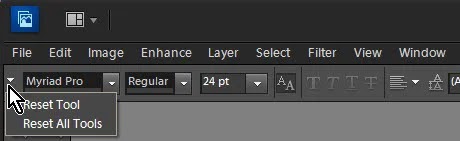
Photoshop Elements Tool Reset
Sometimes when selecting and using tools in Expert Mode or
Full Edit in older versions of Elements, they can behave differently to what is
normally experienced. This can be due to a variety of causes, but the problem
can often be quickly fixed with a tool reset.
How to fix
Select your desired tool, click the tool option menu
(drop-down list) and choose Reset Tool.
For recent versions of Photoshop Elements you will find this
near the bottom-right of the tool options bar.
Photoshop Elements Editor App Without Organizer
Using Photoshop Elements Editor? Mac App Store version? You will
probably need to re-install. Your download should still be available in the Mac
App Store under your "Purchases"
Apple has had problems with expired security certificates
which have affected all apps downloaded from the Mac App Store. We are told by
Apple that all certificates have now been renewed well into the future; so this
error should not happen again. However some people are still experiencing problems.
Here is one solution, reported on the Adobe Community Forums, which has worked
for several users. Give it a try by following each step:
1.
Send the Elements app to the trash
2.
Click the trash can in the dock and empty the
trash
3.
Go to the App Store and sign-out
4.
Re-boot your Mac
5.
Return to the App Store and sign-in again with
your ID
6.
Go to your purchases and download and install
the Elements Editor app again.
This fix appears to work for most users although a few are
required to clean Group Containers with the exception of the catalog. See this
Adobe help link:
Subscribe to:
Posts (Atom)