Sometimes when selecting and using tools in Expert Mode or
Full Edit in older versions of Elements, they can behave differently to what is
normally experienced. This can be due to a variety of causes, but the problem
can often be quickly fixed with a tool reset.
How to fix
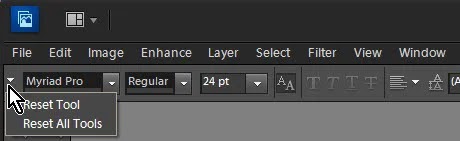
Select your desired tool, click the tool option menu
(drop-down list) and choose Reset Tool.
For recent versions of Photoshop Elements you will find this
near the bottom-right of the tool options bar.

For other versions (PSE10 and earlier) you will find the
icon near the top-left of the tool options bar.