Lightroom CC 2015.6.1 and Lightroom 6.6.1 are now available. This release has a number of bug fixes and adds raw file support for the latest Fujifilm model.
New Camera Support in Lightroom CC 2015.6.1 / 6.6.1
Fujifilm X-T2
More details at:
Lightroom Journal
Search My Blog
Tuesday, 26 July 2016
Wednesday, 20 July 2016
Lightroom Mobile Updates - July 2016
Adobe has announced Lightroom Mobile 2.4 iOS for iPhone, iPad and iPad Pro
New features include
Linear and Radial Selections
Raw Technology Previews
The selective adjustments are similar to the graduated filter and radial filter in the Lightroom desktop application.
The only drawback importing large raw files is that they must first be imported to the Photos App. At present Apple does not permit this to be bypassed meaning more storage space is utilised, until files are deleted from the Photos App.
But it's good to see Adobe continuing to focus on a full photography workflow from mobile devices. More details here:
Lightroom for iOS 2.4
Android
Lightroom for Android 2.1 continues to enhance DNG raw capture for Android supported devices. The built-in camera has a new Pro mode that lets you control the shutter speed, ISO, white balance, and focus all manually, in a brand new interface.
The selective adjustment tools introduced in the iOS version are expected to become available shortly. More details here:
Lightroom for Android 2.1
Adobe Releases Camera Raw 9.6.1
Bugs Fixed in
Camera Raw 9.6.1
-
Uncompressed DNGs
files converted from Fuji X-E2 RAF source images were are unable to be read
-
Errors
that prevented customers from creating a panorama from two HDR DNG source
images.
New Camera
Support in Camera Raw 9.6.1
Fujifilm XT-2
Installation
Instructions
Launch Creative Cloud Desktop and from the Apps tab update Camera Raw
Or from Photoshop
choose Help >> Updates
You will need to
quit Photoshop after starting the updater.
Tuesday, 21 June 2016
Adobe Announces the Release of Photoshop CC 2015.5
Adobe has announced today the release a new version of Photoshop which is being called Photoshop CC 2015.5
This is a full program release following the last update (Photoshop
CC 2015.1.2) in January 2016 but your saved preferences can be transferred during installation. The update will remove the previous version. Adobe says that app download speeds have been
improved by 65% on average and overall performance improvements should be
noticeable. It’s basically doing a lot more in parallel (instead of
serial) plus general speed improvements to workflow.
Headline New Features
Selection & Masking Space with
a new onion skin view as well as the usual backgrounds in white, black etc. and a transparency tolerance slider. The
Selection & Masking Space incorporates the previous refine edge feature. The
new dialog will do everything that was possible with refine edge and more,
notably the ability to extract really fine detail.
Content Aware Crop – with
a new algorithm to replace pixels that would otherwise be discarded; producing
much better results than the manual content aware fill.
Match Font – is a great
aid to design. Drag the rectangular marquee over any font in any image to find
similar fonts installed on the system or available from Adobe Typekit.
Face Aware Liquify – a touch
friendly feature for portrait re-touching. With a dialog similar to some of the
filters like Iris Blur this tool will automatically recognize facial features.
Improvements to some of the best loved recent features; to
make them even more powerful and intuitive to use including:
-
Export As
-
CC Libraries
-
Artboards
Other Improvements
Greater integration with Adobe Stock.
New preference to use the legacy Healing Brush.
Improved brush performance.
Plugins - no need to re-install most 3rd party
plugins following Adobe’s collaboration with developers to establish a new
database single location. However I had to run the installer again for Nik Collection; so this
is obviously work in progress for Adobe.
Many other tweaks and improvements, too many to list here –
visit the Creative Cloud Blog to find out more and watch other videos.
Update Information
Update Information
Wednesday, 8 June 2016
Update for Lightroom CC 2015.6 and Lightroom 6.6
Adobe has announced today the above releases of Lightroom
including raw file support for recent camera models:
Canon PowerShot G7
X Mark II
Leica M-D (Typ 262)
Nikon COOLPIX B700
Panasonic DMC-GX85
(DMC-GX80, DMC-GX7MK2)
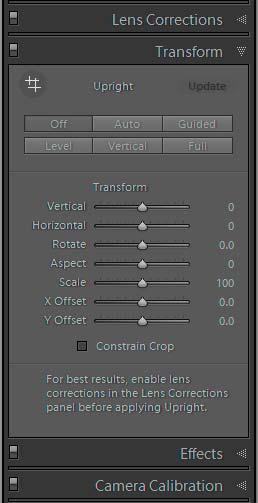
Subscribers to the Creative Cloud version get the new Guided
Upright feature offering a more targeted method of correcting perspective
distortion. This can be found under the new Transform tab grouped with the previous buttons which have been moved from the Lens Corrections tab.
Full details of the changes and bug fixes can be found in
the Lightroom Journal.
Update Lightroom from the CC Desktop App or from the Help Menu when Lightroom is already launched. In case of difficulty use the direct download link.
Adobe Evangelist Julieanne Kost has two video presentations demonstrating
how to use Guided Upright.
Guided Upright in Lightroom CC 2015.6
Guided Upright in Camera Raw 9.6
Subscribe to:
Posts (Atom)